
Hosting Guides
Online servers
Modded local Hosting (Easiest)
In this section of the guide, we will go over downloading and setting up the Essential Mod. If you already know how to use the Essential mod, you may skip this section of the guide.
Official Minecraft Launcher (Windows Only)
!NOTE: This will only work if the other person follows this guide, up until step 6.
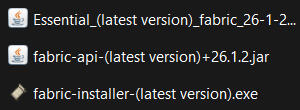
Step 1.) Download Essential Mod, Fabric API, and Fabric Loader, all for minecraft version 26.1.2. You should have these 3 files:
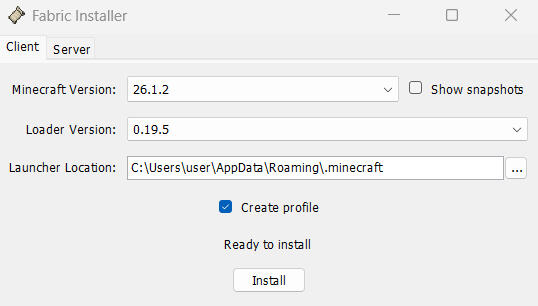
Step 2.) Open the Fabric installer. Set the minecraft version to 26.1.2, and make sure that the launcher location is correct. It should look like this:
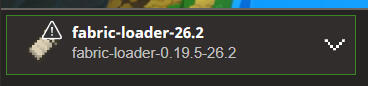
Step 3.) Click install and wait for it to finish. If your minecraft launcher is open, close it and then open it again. You should now see this at the bottom left when you go to the "MINECRAFT: JAVA EDITION" tab on the left:
Step 4.) Click the search on your taskbar, or press the Windows key, search "%appdata%," and press enter. Navigate to Roaming > .minecraft.
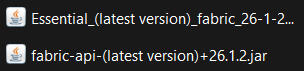
Step 5.) If there isn't one, make a new folder named "mods," and move the rest of the files you installed into the folder. It should look like this:
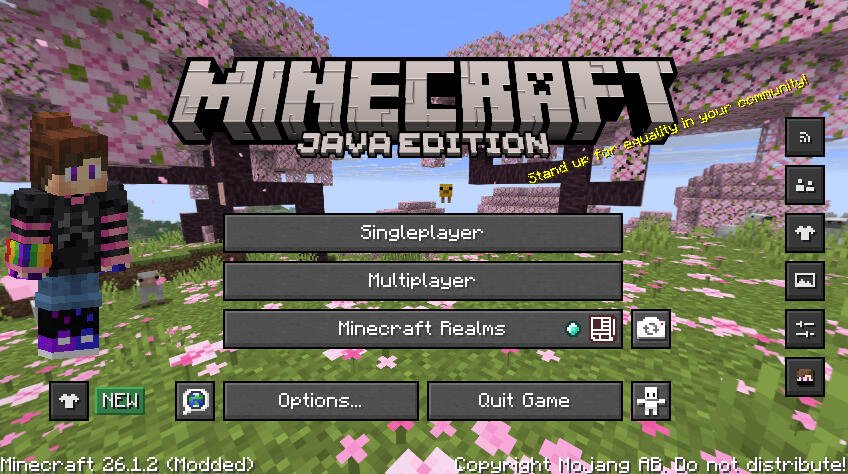
Step 6.) Launch Minecraft, making sure you have the Fabric instance selected. If you've done everything correctly, your client should look like this:
Step 7.) Press the Social button on the right, then press the blue "Add Friend" button near the top left, and search for your friend's EXACT name.
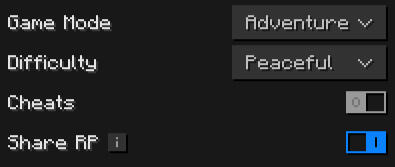
Step 8.) Open a Singleplayer world, press Escape to open the pause menu, and click on the Invite button on the right. For Project: HALLS, these are the required settings:
Step 9.) Search for your newly added friend, click the "+," and hope your friend will join!